Home Lab
VMware cluster, Active Directory, TrueNAS, Docker, OPNsense, Cloudflare and self-hosted services.
Project index
Overview
This project was created to build a realistic lab environment, close to a small enterprise infrastructure, where I can apply and improve the skills developed during the Higher Technical Education program for IT infrastructures and systems: Network, Cloud and Virtualization - ITS Network and Cloud Specialist at ITS Angelo Rizzoli.
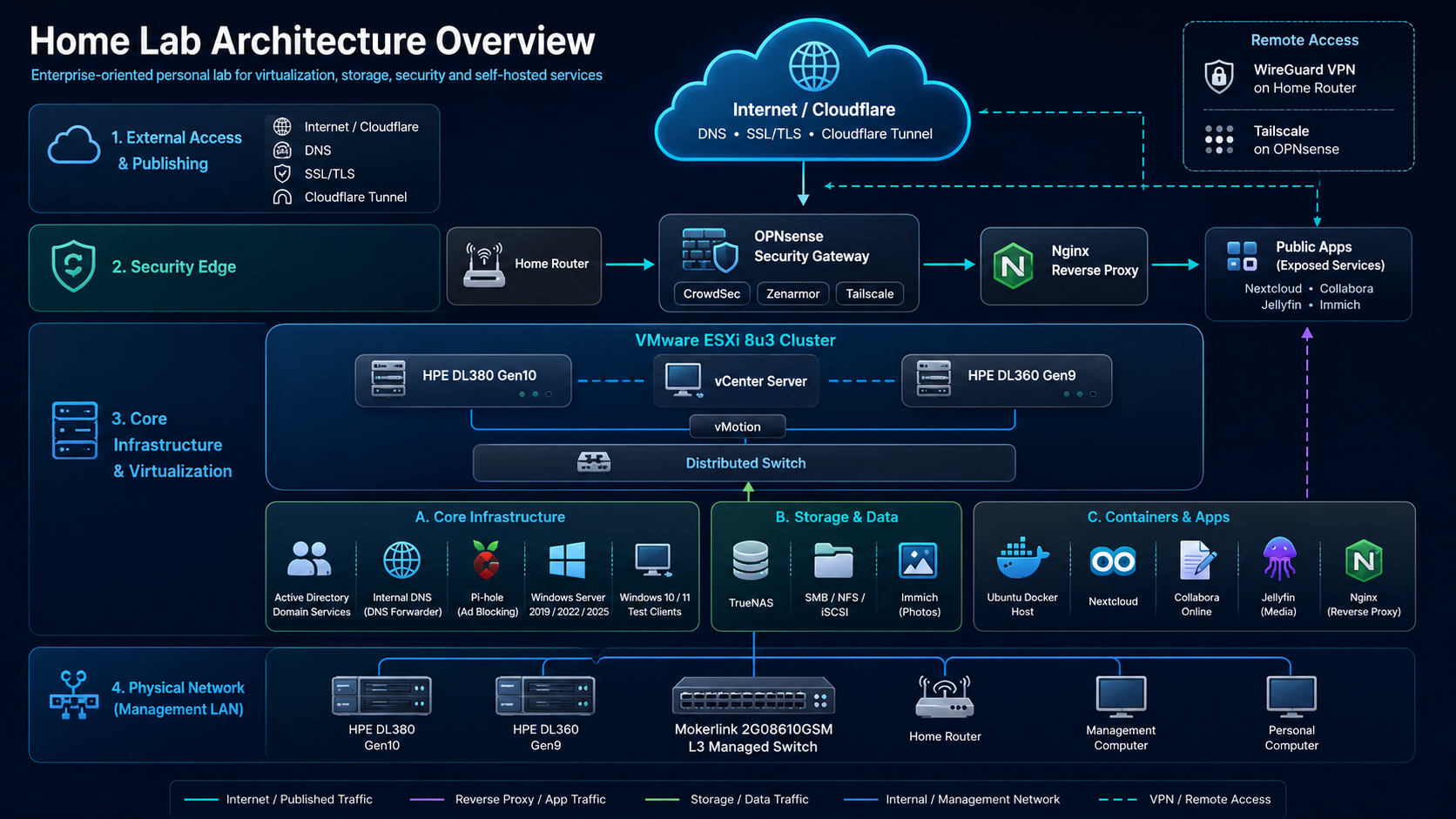
The home lab is based on two HPE ProLiant servers, a DL380 Gen10 and a DL360 Gen9, configured as VMware ESXi 8 Update 3 hosts and centrally managed through vCenter Server. The infrastructure includes virtualization, centralized storage, Microsoft services, Linux systems, containers, firewalling, reverse proxy, secure remote access and self-hosted services.
This project allows me to experiment with real-world scenarios related to networking, virtualization, user management, security, online service publishing, data backup and integration between Windows, Linux and dedicated appliances.
Physical Infrastructure
The physical infrastructure is built around two HPE ProLiant servers: a DL380 Gen10 and a DL360 Gen9. Both servers have been upgraded from their original configuration with improved CPUs, additional RAM and expansion cards dedicated to storage, networking and GPU workloads.
The servers are connected to a Mokerlink Layer 3 switch, which acts as the central point of the lab’s physical connectivity. The same switch also connects the home router, my personal workstation and a dedicated management computer equipped with a serial port, used to configure and manage the switch through the console.
This physical layout allows me to separate device roles, test realistic networking scenarios and maintain a flexible environment for experimenting with different infrastructure configurations.
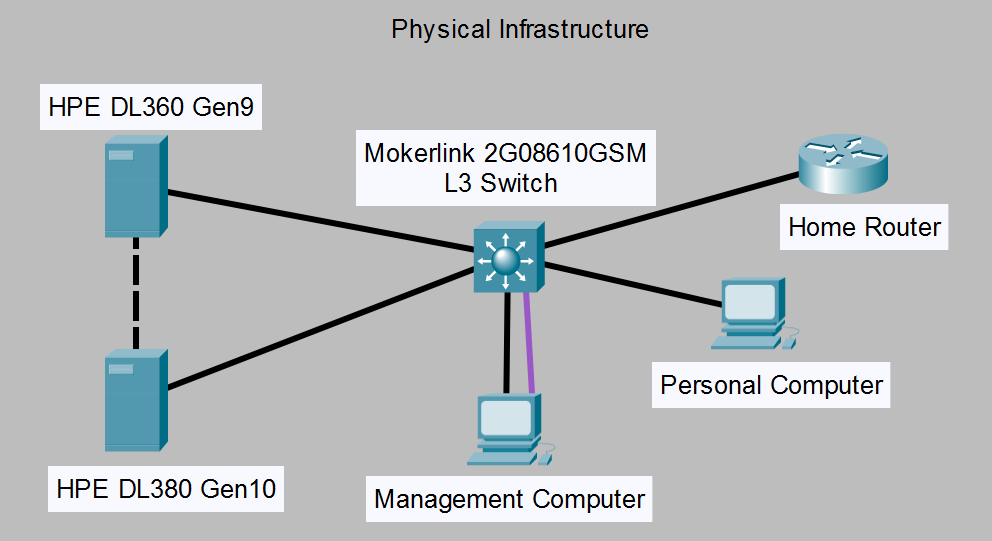
Physical infrastructure overview of the home lab. Black lines represent Ethernet connections, while the purple line represents the serial console connection used for switch management.
VMware Virtualization
Both HPE servers run VMware ESXi 8 Update 3. The hosts are managed through VMware vCenter Server and are part of a vSphere cluster.
Inside the cluster, I configured features such as vMotion and vSphere Distributed Switch. vMotion enables live migration of virtual machines between the two hosts, while the Distributed Switch provides centralized and consistent management of virtual networking, port groups and segments used by the VMs.
The environment hosts several virtual machines running different operating systems, including Windows Server 2019, Windows Server 2022, Windows Server 2025, Windows 10, Windows 11, Ubuntu 22.04 and Ubuntu 24.04. The Windows client VMs are also used to test domain policies and Active Directory configurations.
Virtual Infrastructure
The virtual infrastructure is organized inside the VMware ESXi cluster and centrally managed through vCenter Server.
Virtual machines are grouped by role, including infrastructure services, test systems, Linux workloads and externally exposed services. Internal services include Active Directory, Windows Server machines, Windows 10 and 11 clients for Group Policy testing, TrueNAS for shared storage and Ubuntu virtual machines dedicated to containerized services.
Part of the environment is separated through vSphere Distributed Switch and dedicated to published or externally accessible services such as Nextcloud, Collabora, Jellyfin, Immich and the Nginx reverse proxy. OPNsense manages traffic between networks and contributes to segmentation and protection of the environment.
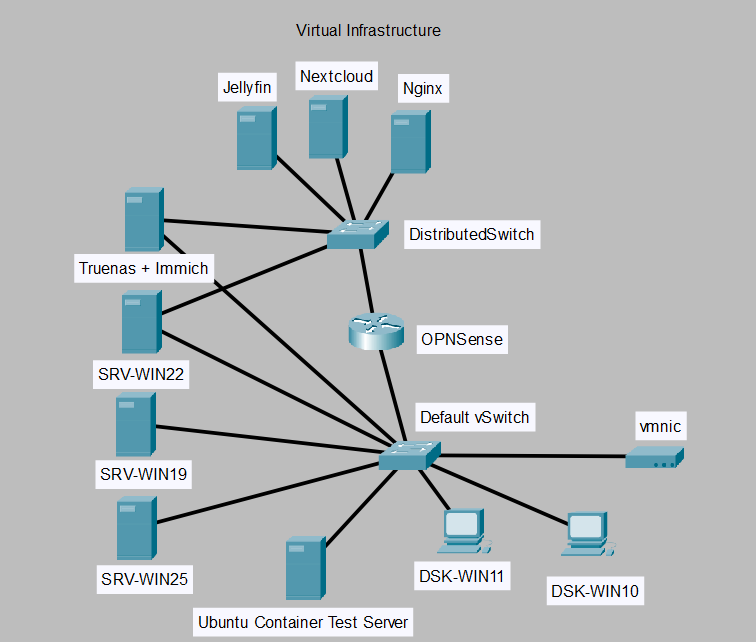
Virtual infrastructure overview showing internal services, test clients, containerized workloads, OPNsense firewall, Nginx reverse proxy and exposed services.
Active Directory, DNS and policies
The lab includes an Active Directory Domain Services environment, used for centralized management of users, groups, authentication and domain policies.
The Domain Controller also provides the internal DNS service required to resolve domain names and on-premise services. The Domain Controller DNS is configured as the primary DNS server in the home DHCP configuration, while public resolvers such as Google and Cloudflare are configured as secondary DNS servers.
This setup allows devices on the home network to easily reach internal services using the same addresses or names configured within the domain. The Domain Controller DNS uses a Pi-hole container as a forwarder, providing DNS filtering for ads, tracking and potentially malicious domains.
This way, internal name resolution remains handled by the Domain Controller, while the whole home network benefits from the DNS filtering provided by Pi-hole.
Storage and data sharing
For storage management, I implemented a TrueNAS server integrated with the Active Directory domain. TrueNAS provides network resources through SMB, NFS and iSCSI, enabling both file sharing and network storage scenarios for virtualized environments.
The Active Directory integration allows permissions and access to shared resources to be managed through domain users and groups, simulating typical enterprise use cases.
TrueNAS also hosts an Immich instance, used for personal photo backup and management. Access to Immich is protected through Cloudflare Tunnel and integrated with Google authentication to improve access control to the service.
Containers and self-hosted services
Many services in the lab are containerized and deployed on dedicated Linux virtual machines. Using Docker allows me to isolate services, simplify dependency management and keep deployments more organized and reproducible.
The services include Pi-hole for DNS filtering, Nextcloud for personal cloud storage, Collabora Online for document editing, Jellyfin for media management and Immich for photo backup.
This part of the project allows me to work with Linux servers, containerization, data persistence, application networking and self-hosted service management in a controlled environment.
Security, remote access and online publishing
Perimeter security is handled by OPNsense, deployed behind the home modem/router. OPNsense manages firewalling, NAT, traffic segmentation and access control between the different home lab networks.
Externally exposed services are configured through Cloudflare for DNS and SSL/TLS management. Between the internal services and OPNsense, I configured an Nginx reverse proxy, used to route traffic to the correct applications while keeping communications encrypted.
For remote access, I configured a WireGuard VPN directly on the home router.
Several security components have been installed and configured on OPNsense, including CrowdSec, Zenarmor and Tailscale. CrowdSec is used to help detect and block suspicious or potentially malicious behavior, while Zenarmor adds network traffic analysis, control and protection capabilities. Tailscale provides a secure and controlled remote access path to the internal infrastructure.
This part of the lab allows me to deepen my understanding of network security, controlled service exposure, reverse proxying, traffic encryption, VPNs, secure remote access, advanced filtering and perimeter hardening.